


Ajustes de estacionalidad: prepare sus campañas de Smart Shopping para los picos de venta
The Smart Shopping algorithm uses machine learning to make decisions based on historical performance data. Despite the fact that it takes seasonality into account, for a very specific and temporary change it is good to tell the algorithm that something special is about to happen. This does not only apply for Smart Shopping campaigns but also for regular shopping campaigns using target-ROAS.
The 2 steps to take:
Step 1: Analyze historic conversion performance
When preparing to run a promotion or sale, you must first identify the historical conversion rates of similar promotions. It is best to use data from previous promotions from a similar time frame. For example, use data from last year’s 40% off Black Friday deal to predict the effect for this year. How much did the conversion rate for the selected campaign(s) increase compared to normal?
Step 2. Apply a seasonality adjustment
Seasonality adjustments are an advanced tool that can be used to inform Smart Bidding of expected changes in conversion rates for future events like promotions or sales.
In the example below we prepared 2 Smart Shopping campaigns where the expected conversion rate on Black Friday is 50% higher.
- Set start time and end time
- Select campaigns
- Set conversion rate adjustment
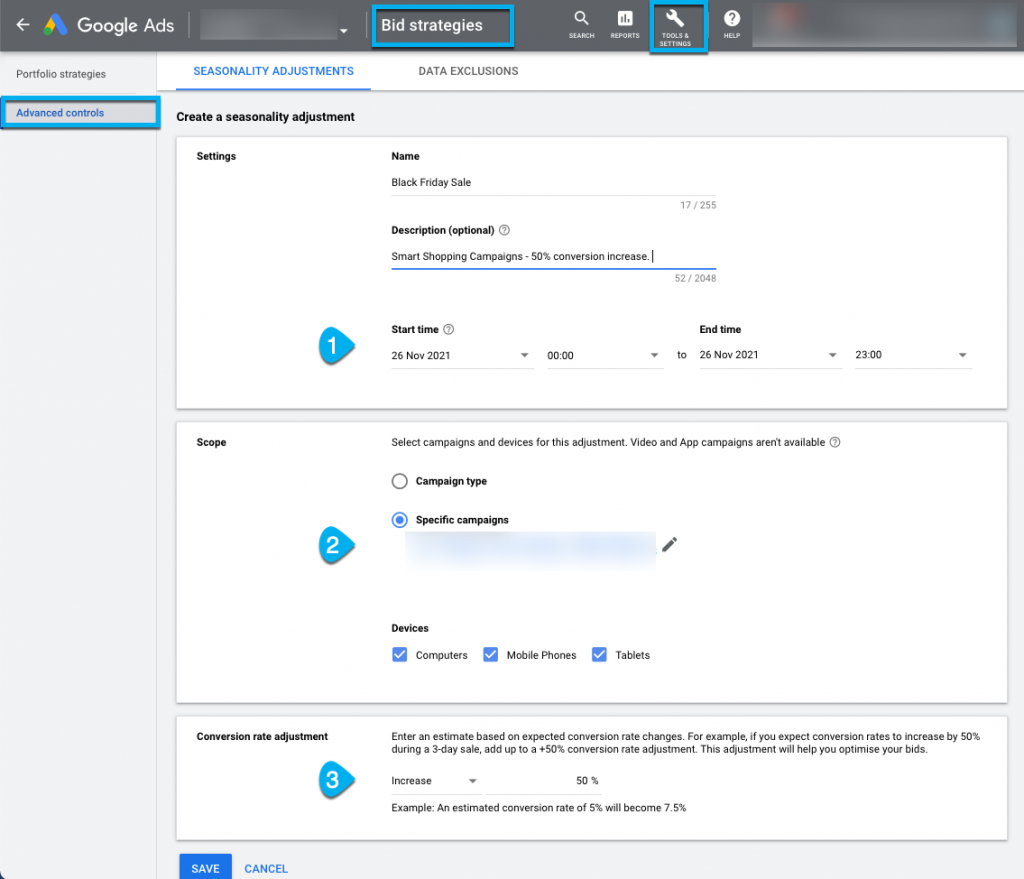
Step-by step guide – how to set a seasonal adjustment:
- Sign into your Google Ads account.
- In the top-right corner, click the tool icon .
- From the drop-down menu, select Bid Strategies under “Shared Library”.
- Select Advanced Controls from the page menu on the left.
- Select the Seasonality Adjustments option at the top.
- To create a new seasonality adjustment, click the plus symbol.
- Give your adjustment a name and description, fill in the event’s start and end dates, and choose your scope and devices.
- Adjust your conversion rate to reflect your estimated conversion rate change.
- Click Save.
- Seasonality adjustments may change how your bid strategies perform. Before you create an adjustment, make sure the information is correct. Click Create seasonality adjustment.
Also check this post: Are your Shopping campaigns ready for the peak?
Nuestros artículos y casos prácticos
.png)
Guía para los ajustes estacionales en Google Ads
.png)
Mejores prácticas para el comercio electrónico en 2026
