


L'obiettivo ROAS perfetto per le vostre campagne pMax / Shopping

- What is ROAS?
- What is a good ROAS target?
- Finding your optimal ROAS target in 2 steps
- Next steps: boosting the ROAS of your campaigns
What is ROAS?
ROAS is short for Return on Ad Spend. This term is used in the advertising industry to describe the amount of revenue that is generated for the amount that you spend on a campaign. The formula to calculate the ROAS is:
ROAS = (revenue attributed to ads/cost of ads) * 100%.
Within Google’s shopping campaigns, ROAS is a metric that you can set as a target to optimise your campaigns. In order for this to work efficiently it is important to add the conversion value of products.
What is a good ROAS target?
One of the tasks in performance marketing is setting the ROAS goals. To set these goals it is key to decide if you want to advertise products to maximise your revenue or to maximise your profit.
Maximising for a higher ROAS (profitability) means a lower revenue (volume).
And maximising revenue (volume) means a lower ROAS (profitability).

ROAS vs Revenue vs Profit
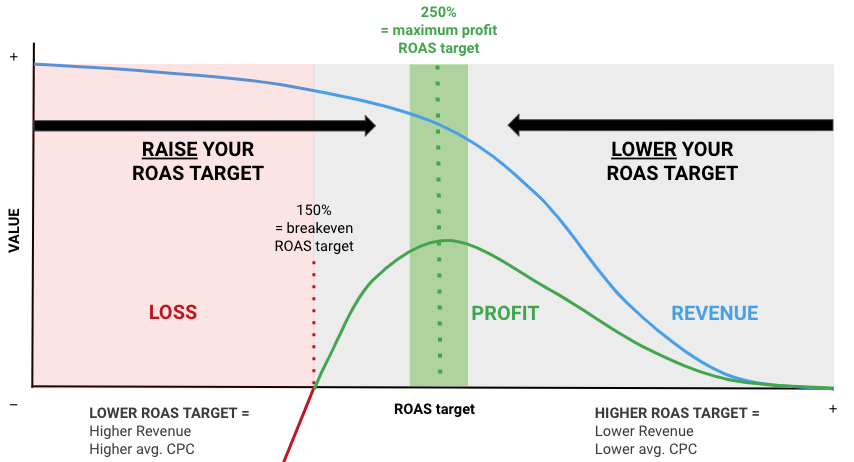
The image below explains the theory behind setting a good ROAS. It shows a situation in which the optimal ROAS is in the middle, setting a ROAS target too low leads to a loss while setting it too high will lead to low revenue.
Finding your optimal ROAS in 2 steps:
Step 1: Determine your breakeven point
Your ROAS target should never be lower than your breakeven point. If it is too low, your campaigns are making a loss. To calculate the breakeven point you can use the margin on the products that you advertise.
Let’s say we are in the fortunate position of having a product margin of 66,6%. (For example: the cost of a product sold is €25 and the selling price is €75).
Break even point = 100% / Margin %
In our case 100% / 66,6% = 150%
This means my ROAS target for this campaign should never be lower than 150% otherwise my products are in the loss zone (the red area in the graph).
Step 2: Finding a good ROAS target
Now that we know that our ROAS should be higher than 150%, the question remains, how much higher?
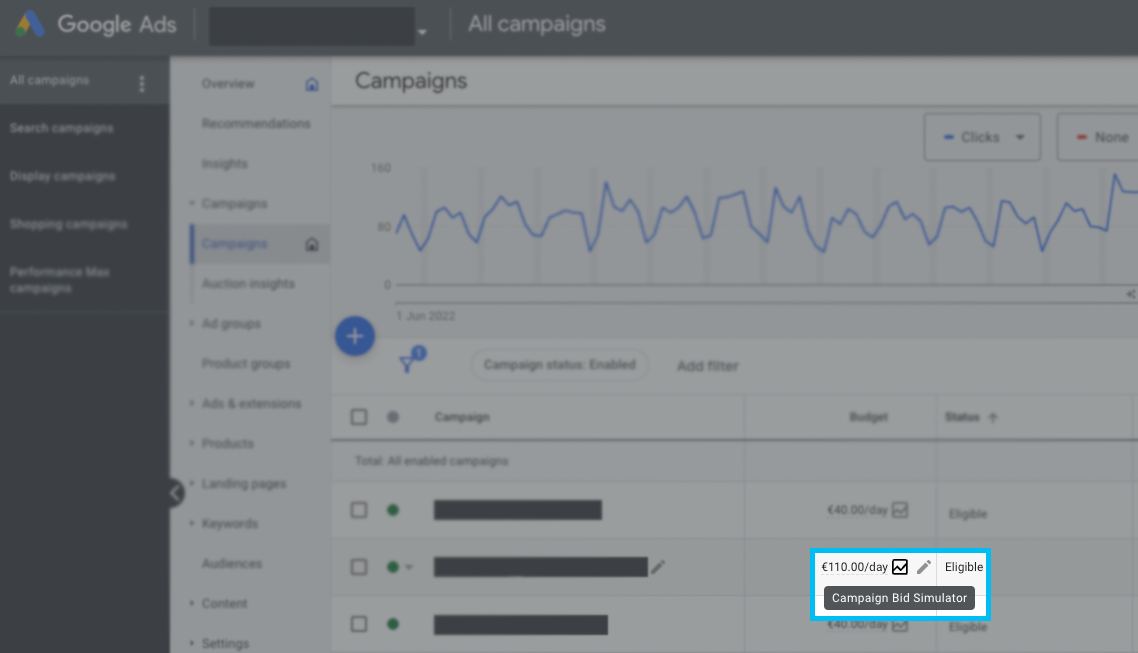
One way to discover your ROAS is by using the Bid Simulator within Google Ads. To open the Bid Simulator, go to your Campaign overview within Google Ads and click on the budget icon that is displayed behind your budget, as highlighted in the image below:
As you can see in the table below the Campaign Target ROAS estimates the Cost an Conversion value for several ROAS targets.

To get a clear view on the maximum profit, you need to combine the estimated Cost and Conversion value with your margin. In the example below we calculated the profit by calculating the margin and detracting the advertising cost.
Profit = (Conv. value * Profit %) – Cost (advertising)
You can see that the ideal target ROAS for the highest profit lies at 250%. Going any lower will increase the market share but would lead to a profit loss.

Next steps: boosting the ROAS of your campaigns
The two steps we explained in this article are the basics of finding the perfect ROAS target. A more advanced next step is to create a campaign structure that allows you to segment on product performance.
For example, if the top 10% of your products deliver 80% of your revenue (your heroes) it is better to invest in those products than wasting budget on products that cost you money (50% of your cost). Use Producthero’s Labelizer Strategy to automatically do this (part of Producthero Pro). This improves the performance of advertisers by 30% and more.
Other ways to optimise your ROAS can also be found outside of your advertising campaigns. For example, by optimising the conversion rate of your website.
Discover how G-Star uses Producthero Pro to structure campaigns
Learn more about Producthero
There are over 10,000 e-commerce organisations small and big (like Nike, G-Star and Ikea), who use Producthero to superboost their shopping ads and optimise their ad spend. This is especially important in key market moments or challenging economic times.
To discover the value it brings to your organisation, you can try Producthero free of cost for 30 days to optimise your campaigns.
I nostri articoli e casi di studio
.png)
Guida agli adeguamenti stagionali in Google Ads
.png)
Migliori pratiche per l'e-commerce nel 2026
