
Shopify Merchant API migration: What you need to know

Google is retiring the Content API for Shopping on 18 August 2026 and replacing it with the new Merchant API. As part of this transition, Shopify is gradually migrating merchants who use the Google & YouTube app.
While this is largely a technical change, it can have a significant impact on your Shopping Ads setup if product IDs change during the migration.
This guide explains what is changing, the potential risks, and why we recommend not manually migrating until you have a way to preserve your existing Shopify product IDs, such as through a feed management solution like Channable.
Understanding the Shopify Merchant API transition
Before taking any action, it is important to understand what is changing behind the scenes.
Key Definitions
- Content API for Shopping: The legacy data pipeline used by apps and platforms to send product data from eCommerce stores to Google Merchant Center.
- Merchant API: Google’s new API ecosystem, which is replacing the Content API for Shopping.
- Shopify Google & YouTube app: The native Shopify plug-in that automates product syncs directly into Google Merchant Center.
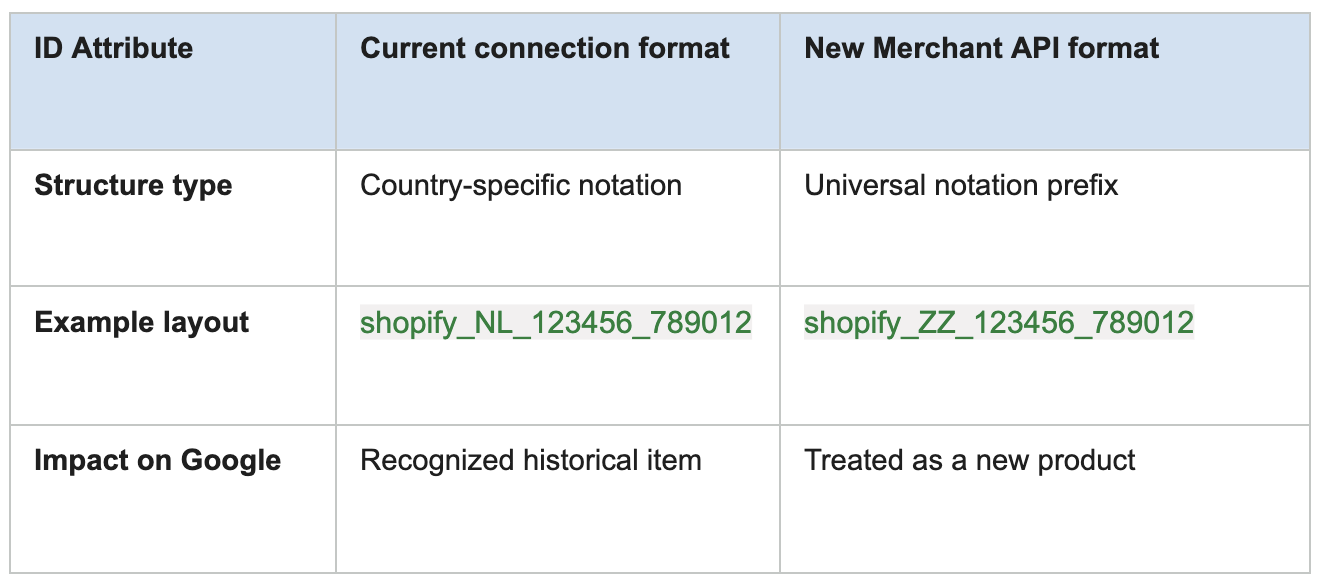
During Shopify’s migration to Google’s Merchant API, the product IDs sent from Shopify to Google Merchant Center may change from country-specific IDs to a new global format. Google relies on exact product ID matching to recognize products and connect them to historical performance data. If the product ID changes, Google may treat the same product as a completely new item.
How this migration can affect your campaigns
Google uses product IDs to recognize your products and store their historical performance data. According to Google's documentation, product IDs should remain stable over time. If they change, Google treats the products as new, meaning the existing performance history associated with those IDs is no longer available.
Merchants on the Shopify Community forum have already reported unexpected product ID changes after Shopify's migration, resulting in broken product syncs and disrupted Shopping campaigns. Reinstalling the app generated a brand-new feed with zero conversion history, forcing their accounts to start from scratch.
Unless you preserve your existing Shopify product IDs, this migration may result in:
- Loss of historical performance data: Historical clicks, conversions, and campaign learnings linked to your product IDs may be lost and cannot be recovered.
- Campaigns re-entering the learning phase: Performance Max and Google Shopping campaigns may temporarily lose efficiency while Google relearns your products.
- Broken feed optimizations: Custom labels, campaign segmentation, Producthero Labelizer, Products AI, and other feed-based optimizations may stop working because they no longer match your updated product IDs.
- Impact beyond paid campaigns: Free Listings, dynamic remarketing, product-level reporting, and feed-based campaign structures.
With peak season approaching for many retailers, unexpected feed changes can create unnecessary disruption at a time when campaign stability is especially important.
Are you affected?
This issue specifically affects merchants who:
- Use Shopify and
- Use Shopify’s Google & YouTube app and
- Run Google Shopping or Performance Max campaigns and
If you do not use Shopify’s Google & YouTube app, this issue is unlikely to affect your account.
How to check if your store has already been migrated
Don't wait for a drop in performance to find out. You can check your migration status in Google Merchant Center.
Step 1: Check your data sources
- Log into your Google Merchant Center account.
- Navigate to Settings > Data sources (Depending on your interface, this may also appear under Products > Feeds > Data sources)
- Look closely at the primary input name under the Source column. If you see "Merchant API" or "Shopify App API" and your old "Content API" line is marked inactive, your store has already been migrated.
Step 2: Check your product IDs
- Go to the All products tab within Merchant Center.
- Review the strings listed under the Product ID column.
- Check whether your IDs still include your country code, such as shopify_NL_, or whether they have changed to the new shopify_ZZ_ format.
What should you do?
If your store has already been migrated
If your product IDs have already changed, the performance history linked to your previous IDs can't be recovered.
While changing your product IDs again won't restore that history, you can reduce the risk of this happening again. Consider moving away from platform-specific product IDs and use a stable identifier instead.
With a feed management solution like Channable, you can keep your original product IDs by overriding Shopify's new IDs (if you still have access to them), or switch to a stable identifier, such as a GTIN. This helps keep your product IDs consistent across future platform changes and migrations.
If your store has not yet been migrated
We recommend that you do not manually migrate until you have a way to preserve your existing Shopify product IDs.
- Do not manually migrate to Google's Merchant API.
- Do not uninstall or reinstall the Shopify Google & YouTube app.
If you are a Producthero customer, your account will be migrated to Channable in the coming months. Once migrated to Channable, you'll be able to configure feed rules that preserve your existing Shopify product IDs before the Merchant API migration takes place. This functionality is available through Channable's Core plan.
Because Google will continue supporting the Content API for Shopping until 18 August 2026, there is still sufficient time to wait for your Producthero migration to Channable before taking action.
Detailed help guides and rule templates will be available to support you throughout the process after the migration.
I nostri articoli e casi di studio
Shopify Merchant API migration: What you need to know

Specialista sotto i riflettori: Louis Kahl