Set the same target ROAS for your Google Shopping campaigns using the Labelizer Strategy

How can you get the best results from your Shopping Ad campaigns? In this article, we will show how you can achieve this by automatically segmenting products based on performance using the Labelizer Strategy. You can do this using Producthero’s platform, which will automatically segment your products assigning them a certain category or label depending on their performance: ‘Heroes’ & ‘Sidekicks’ for your best and good performing products, ‘Villains’ for bad performing products (underperformers) and ‘Zombies’ for your sleeping products.
In Google ads, you create campaigns for these categories. To get the best results, our main recommendation is that you set the same target ROAS for each campaign within Google Ads, but with different budgets. After reading this article you will understand why.
Choose the same target ROAS to automatically segment products in Google Ads
Not sure what ROAS is? Then we advise you to read this article about how to find the perfect ROAS target for your campaigns first.
There are 2 reasons why you should set the same target ROAS when applying the Labelizer Strategy to your campaigns:
- Steering Google’s algorithm in your favour
By setting the same target ROAS in Google Ads, and by giving different budgets to each campaign, you can influence the bids on search terms (specific/generic). For your good performing products (Heroes & Sidekicks) the same target ROAS will be easier to achieve compared to your bad performing products (Villains). In the next part of this article, we will explain how you can do this for each label. - Make the Producthero target ROAS work as it should (not to confuse it with the target ROAS you set within Google Ads). In the Producthero Platform, you can set the Producthero target ROAS in the Advertising section, by clicking the on the three dots on the right side and selecting ‘Edit Strategy’ (see screenshot below).
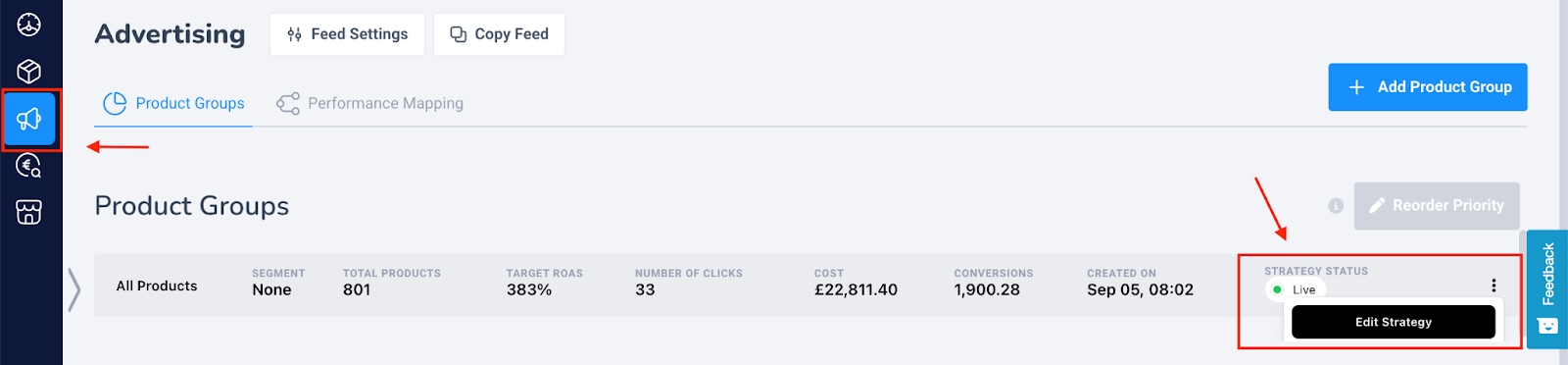

It is important to set up the Producthero target ROAS correctly, since it determines whether your products will become a Hero/Sidekick or Villain/Zombie. For example, if the Producthero target ROAS is set to 350%, this means that products that have an actual ROAS higher than 350%, will become a Hero or Sidekick. And products with an actual ROAS lower than 350%, will become a Zombie or Villain.
We recommend setting your Producthero target ROAS at least 25% lower than your actual ROAS (you can check your actual ROAS both within Google Ads and in the Producthero Platform, in the bottom corner).
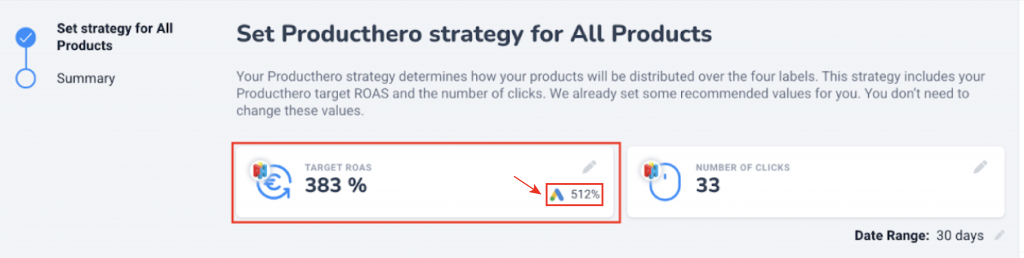
One of the main benefit of the Producthero Labelizer Strategy is that products automatically move between the four labels based on how they perform. For example, a product might be a Villain today, but if its ROAS improves, it can become a Hero the next day. This makes the setup flexible and performance-driven.
For this system to work correctly, all products need to be judged in the same way. If you set a different target ROAS for each Google Ads campaign, Google will bid differently for each group of products. This changes their ROAS and makes it harder for the Producthero target ROAS to assess performance fairly. Later in the article, we show an example of what can happen when different target ROAS values are used.
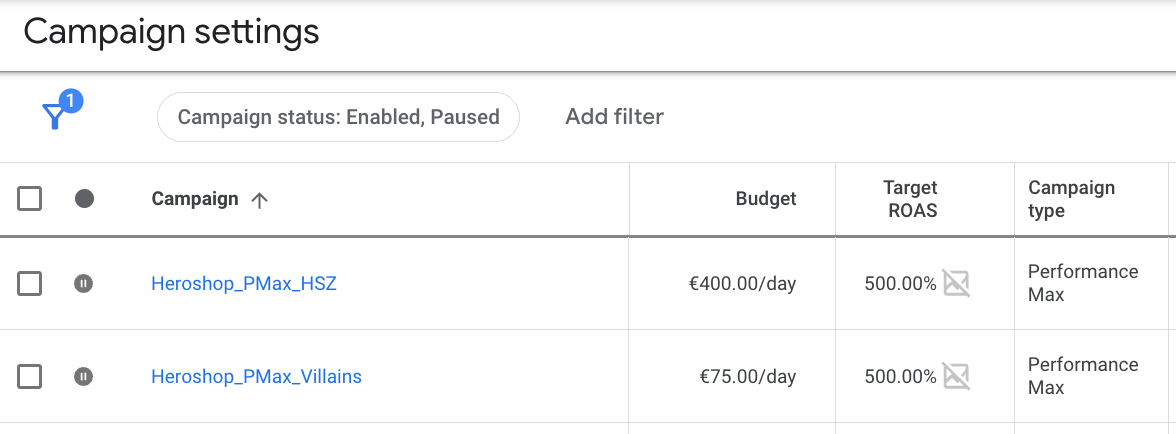
Your Google Ads campaign structure should look like the image below:
- campaigns with different budgets,
- but the same target ROAS in Google Ads.
Explanation of the labels for the Labelizer Strategy
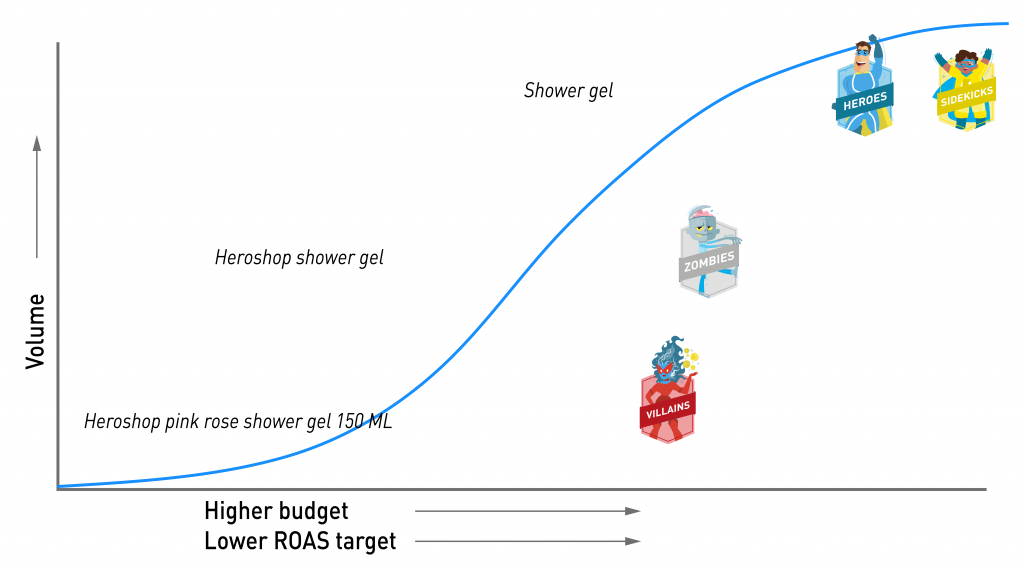
You can see the labels of the Labelizer Strategy in the graph below. The blue line represents your Performance Max campaigns. Below the graph, we will explain how they work.
Villains
Products that perform poorly are labelled as Villains. These products currently lose money, which is of course something you want to minimize. The aim is not to stop advertising them completely but to control costs while giving them a chance to improve.
The first step is to make sure Villains receive the smallest share of your budget compared to the other labels (Zombies, Sidekicks, and Heroes). This prevents overspending on products that are not delivering results.
Next, it is important that all campaigns using the labels in Google Ads are set to the same target ROAS. For Villains, this target ROAS will almost always be higher than their actual ROAS, which simply reflects their underperformance.
Combining a low budget with a relatively high target ROAS forces the Google algorithm to bid more carefully. In practice, this means Google will only bid on searches that are very likely to convert. These are usually high-intent, specific queries, such as “Heroshop pink rose shower gel 150 ml”. While the search volume for these terms is lower than for broader keywords like “shower gel,” users who search for very specific product names tend to be much closer to making a purchase.
Zombies
Zombies are products that are essentially “asleep.” They receive very few impressions and clicks, which means they currently contribute little to no revenue. However, they often have untapped potential. By placing them in a dedicated Zombie campaign, you can give these products more visibility and a chance to prove themselves.
This Zombie campaign should have more budget than the Villains and use the same target ROAS as the other label campaigns. With this setup, the Shopping Ads algorithm has enough room to test these products and determine which ones can improve and which ones consistently underperform. As performance becomes clearer, products will naturally move to the appropriate labels.
Zombies are frequently triggered by mid-tail search queries: terms that are not too generic but also not extremely specific (see graph above). This makes sense, as the additional budget allows Google to explore more of this mid-range keyword traffic. If you were to set a higher target ROAS in Google Ads for this campaign, these products might not receive enough bids to become active.
Sidekicks & Heroes
Sidekicks are products which do quite well but at a low volume, while the Heroes are your absolute top-performing products. General rule of thumb for Shopping Ads, combined with the bidding strategy Maximise Conversion Value, is that that giving these products higher budgets and/or a lower target ROAS (compared to their actual ROAS) allows them to scale more effectively.
This approach results in higher CPCs, more clicks, and increased volume, which is exactly what you want for products that already perform well. These products are also more likely to appear for broader, generic search terms, which tend to drive higher traffic.
What happens when you don’t set the same target ROAS in Google Ads for your campaigns
In this example, we illustrate what can go wrong when each campaign in Google Ads uses a different target ROAS.
Suppose the actual ROAS across all campaigns is 310%.
You then set the following Google Ads target ROAS values:
- Heroes & Sidekicks: 400%
- Villains: 300%
- Zombies: 300%
- in Producthero, you set the Producthero target ROAS (the value that determines label assignments) to 350%
What goes wrong with these settings?
- The Producthero target ROAS is set too high
Setting the Producthero target ROAS at 350%, while your actual ROAS is only 310%, makes the system too strict. Many products that are performing reasonably well will incorrectly fall into the Zombie or Villain groups, even though their performance would justify being labelled Heroes or Sidekicks.
→ Solution: Lower the Producthero target ROAS in the Producthero Platform.
We recommend setting it at least 25% lower than your actual ROAS, which, in this example, is 310%. Therefore, if we take the actual ROAS (310%) as a reference, a good Producthero target ROAS would be 230%.
- Products cannot flow properly between the four labels
Zombies and Villains are set to a 300% target ROAS in Google Ads, while the Producthero target ROAS is 350%. This means these products only need to reach 300% in Google Ads, but must reach 350% to move up to Heroes or Sidekicks. Because of this gap, they are unlikely to ever meet the required threshold.
Heroes and Sidekicks, on the other hand, have a Google Ads target ROAS of 400%, which is above the 350% Producthero threshold, so they will stay correctly labelled. The problem arises when a product drops into the Villains group—because the campaign only aims for 300%, it may never climb back to 350%. Over time, more products get stuck as Villains or Zombies, and fewer become Heroes or Sidekicks.
→ Solution: Set the same target ROAS for all campaigns.
In this example, increasing the Zombie and Villain campaigns to 400% allows products to move freely between all four labels (step by step increase).
Help yourself, help the Labelizer Strategy: set the same target ROAS in Google Ads
In conclusion, if you set the same target ROAS in your Google Ads campaigns, products will shift optimally between the four labels using Producthero’s Shopping Ad Platform. So, if you want to maximise the efficiency of your advertising budget, be sure to set the same target ROAS and different budgets in Google Ads. By doing this you will be able to achieve revenue increases of up to 40%.
Don’t take our word for it, discover how IWB helped their customers increase their revenue.
Our articles and case studies
.png)
Introducing Manual Tagging: Create and manage custom tags that fit your campaign strategy.
.png)